Elite Frontend Engineer: Design Systems, Architecture Patterns, Real-Time Systems, Offline-First Apps, And Frontend Observability
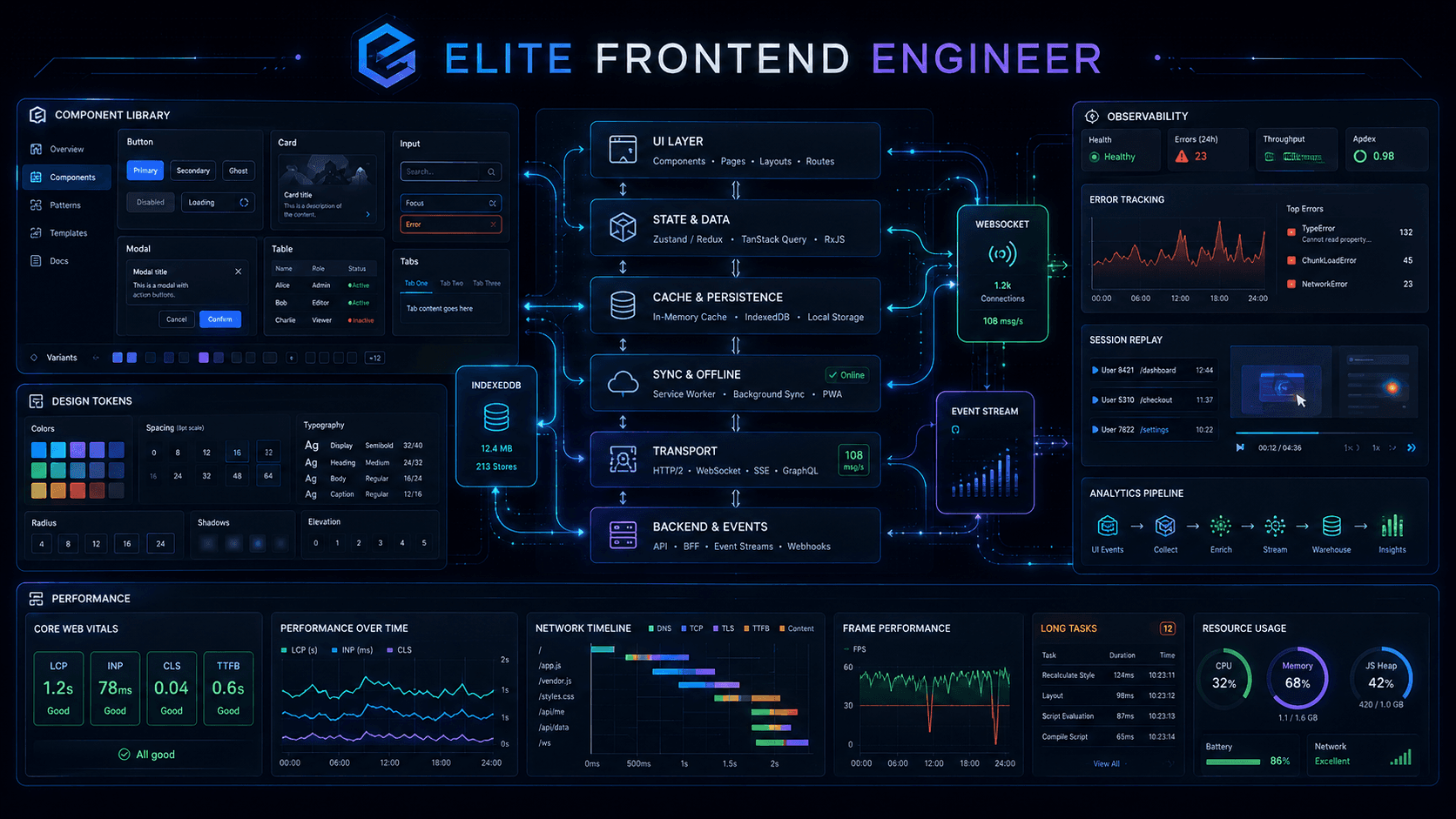
An elite frontend engineer does more than build screens.
They build systems.
They think about scale, consistency, reliability, collaboration, failure modes, offline behavior, real-time UX, platform reuse, and production visibility. They do not only ask, "How do I build this component?" They ask, "How should this product, platform, and team evolve over the next two years without becoming painful to maintain?"
This article covers the topics that often separate strong senior frontend engineers from most frontend developers.
1. Design Systems
A design system is not a button library.
A real design system is a shared language between design and engineering. It defines visual rules, interaction patterns, accessibility expectations, reusable components, tokens, documentation, and governance.
Without a design system, products often become inconsistent:
- Different spacing values across pages.
- Different button behaviors in different teams.
- Repeated accessibility mistakes.
- Hardcoded colors everywhere.
- Slow development because every team rebuilds the same UI primitives.
With a strong design system, teams move faster and produce more consistent, accessible interfaces.
Token System
Design tokens are named values that represent design decisions.
Instead of hardcoding values like #2563eb or 16px everywhere, you give them semantic names.
Bad:

.button {
  background: #2563eb;
  padding: 16px;
}


Better:

.button {
  background: var(--color-primary);
  padding: var(--space-md);
}
Basic token categories:
- Color
- Spacing
- Typography
- Border radius
- Shadow
- Motion
- Z-index
- Breakpoints
Example token structure:
{
  "color": {
    "blue-600": "#2563eb",
    "gray-900": "#111827"
  },
  "space": {
    "xs": "4px",
    "sm": "8px",
    "md": "16px",
    "lg": "24px"
  },
  "radius": {
    "sm": "4px",
    "md": "8px"
  }
}
Token Layers
Mature design systems usually have multiple token layers.
Global Tokens
These are raw values.
Example:
{
  "blue-600": "#2563eb",
  "gray-100": "#f3f4f6"
}
Semantic Tokens
These describe purpose, not raw value.
Example:
{
  "color-background-primary": "{gray-100}",
  "color-text-primary": "{gray-900}",
  "color-action-primary": "{blue-600}"
}
This layer is powerful because brand or theme changes can update meaning without changing component code.
Component Tokens
These define component-specific decisions.
Example:
{
  "button-primary-background": "{color-action-primary}",
  "button-primary-radius": "{radius-md}",
  "button-primary-padding-x": "{space-md}"
}
Senior engineer note: if every component directly consumes raw tokens, theming becomes harder. Semantic indirection improves maintainability.
Component Library
A component library is implementation of the design system in code.
Typical primitives:
- Button
- Input
- Select
- Checkbox
- Modal
- Tooltip
- Tabs
- Table
- Card
- Toast
Good component library principles:
- Accessible by default
- Themeable
- Consistent API
- Composition-friendly
- Minimal business logic
- Well documented
- Tested
- Versioned carefully
Good API:

<Button variant="primary" size="md" disabled={isSaving}>
  Save changes
</Button>


Bad API smell:

<Button
  blue
  rounded
  wide
  extraPadding
  hoverDark
  customShadow
  textWhite
/>
If component API starts reflecting one-off visual exceptions, design system is losing control.
Storybook
Storybook is not only documentation. It is isolated UI development environment, collaboration tool, testing surface, and design system showcase.
Use Storybook for:
- Documenting components
- Showing states and variants
- Reviewing with designers and product teams
- Accessibility checks
- Visual regression testing
- Interaction testing
Example story idea:
Button
- Primary
- Secondary
- Danger
- Disabled
- Loading
- Icon only
Senior engineer note: if component behavior is hard to demonstrate in Storybook, component may be too coupled to app-specific state.
Theming
Theming means changing visual appearance while preserving component behavior and structure.
Common themes:
- Light theme
- Dark theme
- High contrast theme
- Brand themes
CSS variable approach:

:root {
  --color-background: #ffffff;
  --color-text: #111827;
}

[data-theme='dark'] {
  --color-background: #111827;
  --color-text: #f9fafb;
}
Benefits of CSS variables:
- Runtime switching
- Better token layering
- Less rebuild complexity
- Works well with design tokens
Multi-Brand Support
Multi-brand support is harder than dark mode.
Different brands may need:
- Different colors
- Different typography
- Different border radii
- Different imagery style
- Different tone or motion behavior
Good multi-brand strategy:
- Keep common component behavior shared
- Separate brand tokens from component logic
- Use semantic tokens as brand contract
- Allow brand asset injection where needed
- Avoid if brand === x logic everywhere in components
Example approach:
global tokens -> semantic tokens -> brand overrides -> component tokens -> components
Senior engineer rule: brand differences should usually live in tokens and assets, not repeated conditionals across app code.
Design System Governance
Governance is what keeps design system healthy over time.
Questions governance answers:
- Who can add new tokens?
- Who approves new components?
- How are breaking changes released?
- How are accessibility requirements enforced?
- How are design and engineering aligned?
- How are deprecations communicated?
Without governance, design system becomes shared chaos.
Versioning And Adoption Strategy
Design systems usually fail at adoption when:
- APIs change too often
- Migration is painful
- Documentation is weak
- Components are inflexible or too rigid
- Teams do not trust stability
Good adoption strategy:
- Start with high-value primitives
- Document usage and anti-patterns
- Provide migration guides
- Track adoption across apps
- Use semantic versioning
- Deprecate slowly but clearly
Real-World Implementation Advice
- Start with tokens before complex components
- Build primitives first, not giant business components
- Make accessibility default behavior
- Define component API conventions early
- Use Storybook from beginning
- Add visual regression tests for core components
- Separate app-specific logic from design-system packages
- Treat design system as product, not side project
Interview Questions And Answers: Design Systems
Question: What is design token system?
A token system is set of named design values like color, spacing, radius, and typography, used instead of hardcoded values so design decisions stay consistent and themeable.
Question: Why use semantic tokens instead of raw tokens directly?
Semantic tokens represent purpose, such as color-text-primary, which makes theming and multi-brand support easier because components depend on meaning, not raw colors.
Question: What is difference between design system and component library?
A design system includes principles, tokens, accessibility, patterns, and governance. A component library is code implementation of reusable UI pieces.
Question: Why is Storybook useful?
It helps document components, test states in isolation, review UI with designers, and support visual and accessibility testing.
Question: How would you support multiple brands in one design system?
Use layered tokens, especially semantic tokens, and keep component behavior shared while brand-specific differences come from token overrides and assets.
2. Architecture Patterns
Frontend architecture patterns help organize code so products remain maintainable as they grow.
No single pattern is always best. Strong engineers understand tradeoffs and choose based on team size, domain complexity, framework style, and product maturity.
MVC
MVC means Model, View, Controller.
- Model: data and business logic
- View: UI representation
- Controller: handles input and updates model/view
In classic web apps, MVC was common. In modern frontend frameworks, pure MVC is less common because components often mix some view and interaction logic.
MVC is useful conceptually, but many React apps do not map cleanly to it.
MVVM
MVVM means Model, View, ViewModel.
- Model: domain data
- View: UI
- ViewModel: state and logic prepared for UI binding
This pattern fits reactive frameworks more naturally because ViewModel can expose derived state and actions for UI.
In React terms, a custom hook or container layer often behaves like a ViewModel.
Example:

function useProfileViewModel() {
  const [profile, setProfile] = useState(null);
  const [isSaving, setIsSaving] = useState(false);

  async function saveProfile(nextProfile) {
    setIsSaving(true);
    await api.saveProfile(nextProfile);
    setProfile(nextProfile);
    setIsSaving(false);
  }

  return { profile, isSaving, saveProfile };
}
Clean Architecture
Clean Architecture separates application into layers with clear dependency direction.
Typical layers:
- Domain
- Application / use cases
- Infrastructure
- Presentation
Frontend mapping example:
domain/
  entities/
  rules/
application/
  use-cases/
infrastructure/
  api/
  storage/
presentation/
  pages/
  components/
  hooks/
Benefits:
- Better separation of concerns
- Easier testing of business logic
- Less framework coupling
- Easier swap of infrastructure dependencies
Risks:
- Overengineering for small apps
- Too much indirection
- Slower onboarding if structure becomes abstract
Senior engineer note: clean architecture is useful when business logic is complex. For simple dashboards, too much layering can become ceremony.
Feature-Based Architecture
Feature-based architecture organizes code by business capability rather than file type.
Bad structure for large app:
components/
hooks/
utils/
pages/
Better feature structure:
features/
  auth/
    components/
    hooks/
    api/
    types/
  checkout/
    components/
    hooks/
    api/
    utils/
Benefits:
- Clear ownership
- Easier scaling
- Better domain boundaries
- Less cross-feature coupling
This is often one of most practical patterns for React apps.
Atomic Design
Atomic Design breaks UI into levels:
- Atoms
- Molecules
- Organisms
- Templates
- Pages
Example:
- Atom: Button, Input
- Molecule: SearchInput
- Organism: Header
- Template: ProductPageLayout
- Page: Product Details Page
Benefits:
- Encourages reusability
- Good for design systems
- Helps discuss component hierarchy
Risks:
- Teams can become too focused on naming hierarchy instead of business clarity
- Not all product UIs fit cleanly into strict atomic levels
Use it as thinking tool, not religion.
State Machines
State machines are extremely useful for complex UI flows but often missing from many frontend articles.
They are useful when UI has explicit states and transitions:
- Checkout flow
- Authentication flow
- Payment process
- Upload process
- Multi-step onboarding
Example states:
idle -> loading -> success
idle -> loading -> error
State machines help prevent impossible states.
Bad UI state:
isLoading = true
isSuccess = true
error = "Something failed"
These flags can conflict.
Better:
status = 'loading' | 'success' | 'error'
Libraries like XState can help, but even plain discriminated unions improve clarity.
Architecture Tradeoffs
Questions to ask:
- Is business logic simple or complex?
- How many teams will work in codebase?
- Do we need strong domain boundaries?
- How much reuse is expected?
- Is product stable or rapidly changing?
- Will abstraction reduce pain or increase it?
Senior engineer rule: architecture should reduce cognitive load, not increase it.
Real-World Implementation Advice
- Use feature-based architecture for most medium and large React apps
- Add clean architecture boundaries only when domain complexity justifies it
- Use state machines for complex flows with many states
- Avoid abstracting everything too early
- Keep framework glue close to UI, business rules separate when needed
- Review architecture through team workflows, not only folder diagrams
Interview Questions And Answers: Architecture Patterns
Question: What is difference between MVC and MVVM?
MVC uses controller to handle user input and coordinate model and view. MVVM uses view model to expose state and actions for binding with reactive UI.
Question: When is clean architecture useful in frontend?
It is useful when business logic, workflows, and infrastructure concerns are complex enough that separating domain, use cases, APIs, and UI gives clarity and testability.
Question: Why is feature-based architecture popular in React apps?
Because it groups code by business capability, which improves ownership, scaling, and maintainability in large apps.
Question: What is Atomic Design?
Atomic Design is UI composition model that organizes components into atoms, molecules, organisms, templates, and pages.
Question: Why use state machines in frontend?
They make complex flows explicit, prevent impossible states, and improve reliability in multi-step or async-heavy interfaces.
3. Real-Time Systems
Real-time frontend systems update UI as events happen, often without page reloads.
Examples:
- Chat apps
- Live dashboards
- Trading screens
- Collaboration tools
- Notification systems
- Live sports updates
Real-time systems are difficult because they involve latency, ordering, reconnection, duplicates, temporary inconsistency, and user expectations.
WebSockets
WebSockets provide bidirectional communication between client and server over single long-lived connection.
Use WebSockets when:
- Client and server both need to send messages anytime
- Low latency matters
- High event frequency exists
- Two-way collaboration is needed
Examples:
- Chat messages
- Typing indicators
- Multiplayer interactions
- Live collaboration cursors
Challenges:
- Reconnection handling
- Auth refresh
- Message ordering
- Duplicate events
- Backpressure
- Subscription management
SSE
SSE means Server-Sent Events.
It is one-way: server sends updates to client.
Use SSE when:
- You only need server-to-client streaming
- Simplicity matters
- Event volume is moderate
- Automatic reconnect behavior is useful
Examples:
- Notification feed
- Job status updates
- Live dashboards
- Server progress events
Compared with WebSockets:
- SSE simpler for one-way updates
- WebSocket more flexible for two-way interaction
Event Streaming
Event streaming means frontend consumes sequence of events over time rather than only fetching complete snapshots.
Examples:
- Live analytics points
- Order book updates
- Server activity logs
- Notification streams
Important design idea:
- Snapshot gives current state
- Event stream gives changes over time
Many systems need both:
- Load initial snapshot with HTTP
- Apply real-time delta updates through WebSocket or SSE
Polling Vs Real-Time Transport
Polling means repeatedly requesting latest data.
Simple but less efficient:
Client asks every 5 seconds: any updates?
Use polling when:
- Real-time is not strict
- Infrastructure simplicity matters
- Update frequency is low
Use WebSocket or SSE when:
- Lower latency matters
- Frequent updates occur
- Large scale polling would be wasteful
Optimistic UI
Optimistic UI updates interface before server confirms success.
Example:
- User clicks Like
- UI immediately shows liked state
- Request goes to server
- If request fails, UI rolls back
Why it matters:
- Makes app feel fast
- Reduces perceived latency
But optimistic UI adds complexity:
- Rollback on failure
- Temporary IDs
- Eventual consistency
- Duplicate updates when server response also arrives
- Conflict handling
Example optimistic message:
const tempMessage = {
  id: `temp-${Date.now()}`,
  text,
  status: 'sending',
};
When server responds, replace temp message with real message ID and status.
Ordering, Deduplication, And Idempotency
Real-time systems often break when engineers assume events always arrive once and in order.
They may arrive:
- Late
- Out of order
- More than once
- After reconnect
Frontend must often handle:
- Event IDs
- Sequence numbers
- Deduplication logic
- Last processed timestamp or cursor
Idempotency means applying same event twice should not corrupt state.
Reconnection Strategy
Connections fail. Real-time frontend must handle that gracefully.
Good reconnection strategy:
- Show connection state to user when important
- Retry with exponential backoff
- Re-authenticate if token expired
- Re-subscribe to channels after reconnect
- Re-fetch latest snapshot if event gap may exist
Presence And Live UX
Common live UX features:
- Typing indicators
- Online/offline presence
- Read receipts
- Live counters
- Collaborative cursors
These should not overload system with too many updates. Often they need throttling or aggregation.
Real-World Implementation Advice
- Start with polling if real-time value is low
- Use HTTP for initial snapshot and real-time transport for updates
- Design deduplication early
- Plan reconnect behavior before release
- Keep optimistic UI reversible
- Avoid assuming server events are perfect
- Test unstable network conditions
Interview Questions And Answers: Real-Time Systems
Question: When would you choose WebSocket over SSE?
Use WebSocket when two-way communication is required, like chat or collaboration. Use SSE when only server-to-client updates are needed and simpler architecture is enough.
Question: What is optimistic UI?
Optimistic UI updates the interface before server confirmation to reduce perceived latency, then confirms or rolls back based on server response.
Question: Why are ordering and deduplication important in real-time systems?
Because events can arrive late, out of order, or more than once. Without handling this, UI state can become inconsistent.
Question: How would you design real-time chat frontend?
Use HTTP for initial history, WebSocket for live events, optimistic sending, retry logic, deduplication, connection state, pagination, and virtualized message list.
Question: Is polling always bad?
No. Polling is often fine when update frequency is low and real-time requirements are not strict.
4. Offline-First Applications
Offline-first means app remains usable even when network is unavailable or unstable.
This is important for:
- Field workers
- Travel apps
- Note-taking apps
- Productivity tools
- Low-connectivity regions
- Mobile web usage
Offline-first is not only technical storage problem. It is UX, sync, conflict resolution, and trust problem.
Service Workers
Service workers run in background and can intercept network requests.
They enable:
- Offline asset caching
- Request interception
- Background sync
- Faster repeat loads
- App shell strategies
Common cache strategies:
- Cache first
- Network first
- Stale while revalidate
- App shell caching
Use cases:
- Static assets cache first
- API data stale while revalidate
- Fresh document network first
Service workers are powerful but dangerous if cache invalidation is poor. A broken service worker can keep serving broken code.
IndexedDB
IndexedDB is browser database for storing structured data on client.
Use it for:
- Drafts
- Offline records
- Queued actions
- Cached server data
- Sync metadata
- Large datasets that do not fit simple storage
Why not only localStorage?
- localStorage is synchronous
- Limited and simplistic
- Poor for large structured datasets
IndexedDB works better for real offline-first applications.
PWA
PWA means Progressive Web App.
PWA features may include:
- Installable app experience
- Offline support
- Service worker
- Web app manifest
- Splash screen / app icon
- Fullscreen-like experience
- Push notifications
PWA does not automatically mean great offline UX. It only provides capabilities. You still need correct caching, sync, and interaction design.
Data Sync Strategy
Offline-first apps need explicit sync model.
Typical model:
User changes data locally
Change stored in local database
UI updates immediately
Action added to sync queue
When network returns, queue syncs with server
Conflicts resolved if needed
Questions to solve:
- What happens if same record changes on two devices?
- What if user edits offline for long time?
- Which side wins in conflict?
- Do we merge, reject, or ask user?
- How do we show sync status?
Conflict Resolution
Offline-first becomes hard when local and server data differ.
Common strategies:
- Last write wins
- Server wins
- Client wins
- Field-level merge
- User-assisted conflict resolution
Senior engineer note: choose conflict strategy based on domain. Notes app and payment system should not resolve conflicts same way.
Background Sync And Retry
Queued offline actions should not disappear silently.
Use:
- Retry queues
- Exponential backoff
- Background sync where supported
- Clear status indicators
- Manual retry for failed actions
Offline UX Principles
Users need to understand what is happening.
Good offline UX includes:
- Clear offline indicator
- Clear sync status
- Local save confirmation
- Retry state for failed actions
- No fake success for irreversible actions unless clearly queued
Bad offline UX:
- User thinks data is saved to server but it is only local
- Silent conflicts overwrite newer work
- App fails without explanation when network drops
Real-World Implementation Advice
- Start offline support with high-value workflows, not whole app at once
- Store drafts and queued mutations locally
- Design sync states in UI
- Use IndexedDB for meaningful client persistence
- Keep service worker update logic safe and observable
- Test airplane mode, flaky network, refresh during sync, and multi-tab behavior
Interview Questions And Answers: Offline-First
Question: What is offline-first application?
An offline-first application remains usable without reliable network by storing important data locally and syncing changes when connectivity returns.
Question: What is role of service worker in offline-first apps?
It intercepts network requests, enables caching strategies, supports offline asset delivery, and can assist background synchronization.
Question: Why use IndexedDB instead of localStorage?
IndexedDB supports larger, structured, asynchronous storage and is more suitable for complex offline data and queues.
Question: What is hardest part of offline-first design?
Conflict resolution, sync reliability, and making sync state understandable to users are often hardest parts.
Question: What is background sync useful for?
It helps retry queued actions when network becomes available again, improving resilience for offline or unstable connections.
5. Frontend Observability
Observability means understanding what your frontend is doing in production.
Logging alone is not enough.
Frontend observability usually includes:
- Error tracking
- Performance monitoring
- Session replay
- Analytics events
- Release tracking
- User context
- Alerting
Elite frontend engineers build systems where failures can be seen, understood, and acted on quickly.
Error Tracking
Error tracking tools capture runtime failures in production.
Examples:
- JavaScript exceptions
- Unhandled promise rejections
- API errors surfaced through UI
- Render crashes
- Failed route loads
Good error tracking setup includes:
- Source maps
- Release version
- Environment tags
- Browser/device metadata
- User impact grouping
- Meaningful custom context
Do not log sensitive data like tokens, passwords, or personal information.
User Session Replay
Session replay records how users interacted with app before issue happened.
It helps answer:
- What did user click?
- What state was visible?
- Did UI freeze?
- Was error preceded by strange navigation?
Benefits:
- Faster debugging
- Better reproduction
- Better product insight
Risks:
- Privacy concerns
- Sensitive data exposure
- Performance overhead if implemented badly
Senior engineer rule: mask sensitive fields by default. Privacy must be designed, not added later.
Performance Monitoring
Performance monitoring tracks how app behaves for real users.
Common signals:
- Core Web Vitals
- Route transitions
- API latency impact
- Slow interactions
- Long tasks
- JavaScript errors correlated with poor performance
Useful strategy:
- Measure route-level performance
- Measure critical flows like checkout or editor load
- Tag by release and geography
- Segment by device class
Analytics Architecture
Analytics architecture is often messy in many frontend apps.
Common bad pattern:
- Every component fires random analytics events with inconsistent naming
Better pattern:
- Define event taxonomy
- Standardize payload schema
- Centralize tracking utilities
- Version event contracts
- Separate product analytics from debugging telemetry
Example event:
{
  "event": "checkout_submitted",
  "timestamp": 1710000000,
  "userId": "123",
  "orderValue": 95.5,
  "currency": "USD"
}
Questions for analytics architecture:
- Who owns event names?
- Which fields are required?
- How do we prevent duplicate events?
- How do we version event schema?
- How do we avoid PII leakage?
Logs, Metrics, And Traces In Frontend Context
Even though frontend is not backend, similar observability thinking helps.
- Logs: error messages, debug events, custom telemetry
- Metrics: counts, rates, latency, vitals
- Traces: end-to-end transaction timing across user action, network, and render
Example:
User clicks checkout -> frontend trace starts -> API request -> server processing -> response -> UI render completeThis helps connect user pain to actual system path.
Release Health And Regression Detection
Observability should answer:
- Did latest release increase error rate?
- Did route load time regress?
- Did one browser start failing?
- Did checkout conversion drop after UI change?
- Did session replay show confusing flow?
Without release-aware observability, teams often guess instead of knowing.
Privacy And Compliance
Observability must respect privacy.
Important rules:
- Mask sensitive inputs
- Avoid recording secrets
- Redact auth headers
- Limit PII in analytics
- Follow consent rules
- Respect regional compliance requirements
Frontend Observability Checklist
- Error tracking configured
- Source maps uploaded securely
- Session replay privacy rules defined
- Core flow performance measured
- Event taxonomy documented
- Release health tracked
- Alerts created for serious regressions
- Sensitive data masked by default
Interview Questions And Answers: Frontend Observability
Question: What is frontend observability?
Frontend observability is ability to understand frontend behavior in production using error tracking, performance monitoring, session replay, analytics, and release-aware telemetry.
Question: Why is session replay useful?
It helps reproduce real user issues by showing what happened before failure, which often reduces debugging time significantly.
Question: What is good analytics architecture?
Good analytics architecture has standard event naming, clear payload schema, central tracking utilities, privacy controls, and governance over event contracts.
Question: What privacy concerns exist in observability tools?
Sensitive user data, tokens, form fields, PII, and private content may be captured unless explicitly masked or redacted.
Question: How would you detect frontend regression after release?
Track errors, performance metrics, conversion-critical events, session issues, and release versions so changes can be correlated with specific deployments.
6. Extra Topics Elite Frontend Engineers Often Know
These topics were not fully covered in first two articles, but they strongly matter in advanced frontend work.
Feature Flags
Feature flags let teams release code safely without exposing features to everyone at once.
Uses:
- Gradual rollout
- A/B testing
- Emergency kill switch
- Role-based feature access
- Decoupling deploy from release
Risks:
- Flag sprawl
- Dead code accumulation
- Complex test matrix
Strong teams define ownership and cleanup policy for flags.
Resilience Patterns
Frontend resilience means app handles partial failure gracefully.
Patterns:
- Retry with backoff
- Timeout handling
- Fallback UI
- Cached stale data
- Partial rendering
- Graceful degradation
Example:
- Recommendations widget fails, but checkout still works
Elite engineers avoid all-or-nothing UX when possible.
API Client Architecture
Large apps benefit from consistent API layer.
Good API client layer handles:
- Base URL config
- Auth headers
- Retries
- Error normalization
- Request cancellation
- Typed responses
- Logging hooks
This reduces duplicated network logic across components.
Frontend Platform Thinking
At elite level, some engineers start acting like frontend platform engineers.
They improve:
- Build tooling
- Shared UI infrastructure
- Lint rules
- Testing tooling
- Release workflows
- Observability defaults
- Performance budgets
This work multiplies productivity for entire team.
7. Senior-Level Scenarios
Scenario 1: Design system adopted by five product teams but everyone keeps overriding components. What do you do?
Answer:
Check whether design system is too rigid, missing important variants, or poorly documented. Audit override patterns. Move repeated overrides into official tokens or component variants. Strengthen governance and contribution model. Do not solve by banning overrides without understanding why teams need them.
Scenario 2: Live dashboard misses some events after reconnect. How do you fix it?
Answer:
Add reconnect flow that re-fetches snapshot or resumes from last event cursor. Introduce event IDs or sequence numbers, deduplication, and gap detection. Do not assume reconnect stream alone guarantees complete state.
Scenario 3: Offline field app shows "saved" even though server never received data. What is wrong?
Answer:
UX is lying. Distinguish between local save and server sync. Store local mutation in queue, display sync status, and show failure or pending state clearly. Users must know whether action is local-only or confirmed remotely.
Scenario 4: Error tracker shows crash spike after release, but engineers cannot reproduce locally. What next?
Answer:
Use release tagging, source maps, browser/device metadata, and session replay. Check whether issue happens only in certain browser, region, experiment flag, or user flow. Reproduction often needs production-like environment or real user path.
8. Production Checklist
Design Systems
- Tokens layered correctly
- Semantic tokens defined
- Accessibility built into primitives
- Storybook documents states
- Multi-brand strategy avoids component conditionals
- Governance and versioning defined
Architecture
- Features have clear boundaries
- State types separated
- Complex flows use explicit state modeling
- Abstractions justified by real complexity
- API layer consistent
Real-Time Systems
- Snapshot plus event update model defined
- Reconnect logic implemented
- Deduplication and ordering handled
- Optimistic UI reversible
- Connection state visible when important
Offline-First
- Service worker strategy clear
- IndexedDB used for durable local data when needed
- Sync queue implemented
- Conflict strategy defined
- Offline UX communicates truthfully
Observability
- Errors tracked
- Source maps uploaded securely
- Session replay privacy configured
- Core flows instrumented
- Event taxonomy documented
- Release regression detection enabled
Final Advice
To become elite in frontend, stop seeing frontend as only component work.
Frontend at high level is system design, reliability engineering, interaction design, platform thinking, data flow design, user trust, and team scalability.
For interviews, answer with this shape:
What problem it solves -> how it works -> tradeoffs -> real implementation -> failure modes -> production concerns
For real work, remember this:
Best frontend engineers do not only ship features.
They build systems that survive scale, failure, and change.